



Dual-Channel Volume Adjustment for Hearing aids
For OTC hearing aid users, the ability to adjust volume anytime—quickly and independently—is essential for achieving clear, comfortable sound.
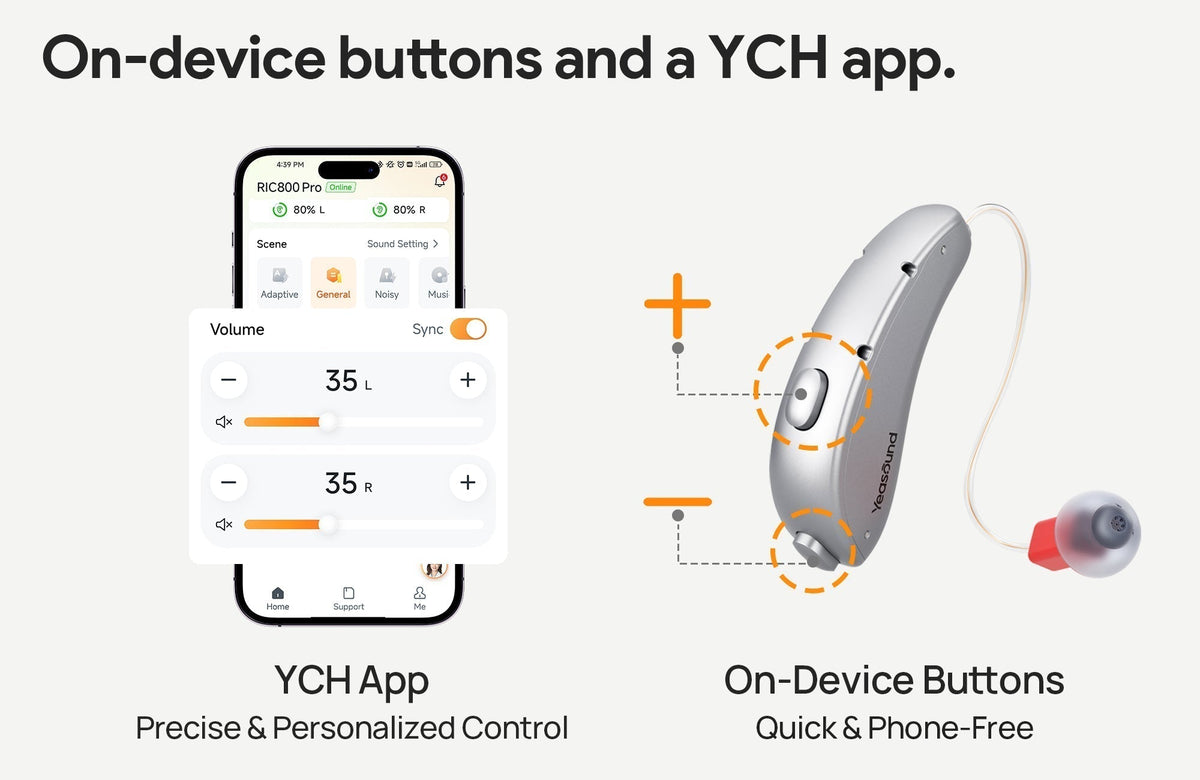
Yeasound RIC800 offers two complementary ways to fine-tune your listening experience: on-device buttons and a YCH app.
Yeasound RIC800 offers two complementary ways to fine-tune your listening experience: on-device buttons and a YCH app.

1. On-Device Buttons — Quick & Phone-Free
Button Functions
· Upper Button: Volume Up
· Lower Button: Volume Down
How It Works
· Short-press to adjust the volume step by step
· Each change includes a soft tone or a slight loudness shift
· Pressing either side adjusts both ears simultaneously
Best For
· Moving between quiet and noisy environments
· Moments when your hands are full
· Users who prefer simple, intuitive controls
Tip: Adjust gradually to better sense changes and avoid sudden loudness.
2. YCH App — Precise & Personalized Control
The app provides visual, precise adjustments—ideal for users who prefer finer control or find on-device buttons less convenient.
Sync Control
· Keeps left and right ear volumes aligned
· Best for users with similar hearing levels in both ears
Independent Left/Right Adjustment
· Control each ear separately using sliders or “+ / –”
· Helpful for asymmetric hearing or uneven environmental noise
Independent Bluetooth Streaming Volume
· Adjust Bluetooth audio (music, videos, calls) independently
· Environmental hearing remains unaffected
· Fine-tune streaming volume directly in the Streaming interface
3. Safe Listening & Practical Tips
· Louder doesn't always mean clearer—aim for comfortable, natural sound
· In noisy environments, switch to a suitable listening mode rather than simply increasing volume
· During Bluetooth streaming, balance the environmental sound and streaming volume for the best clarity
· Clean your receiver and ear tips regularly to maintain consistent performance
4. Frequently Asked Questions
Q: Can I adjust only one ear?
Yes. Turn off “Sync” to adjust each ear independently.
Yes. Turn off “Sync” to adjust each ear independently.
Q: Why does the app volume change when I press the hearing aid buttons?
Both controls are synchronized, ensuring an accurate real-time display.
Both controls are synchronized, ensuring an accurate real-time display.
Better Control, Better Hearing
With the convenience of on-device buttons and the precision of the mobile app, Yeasound RIC800 lets you achieve your ideal listening experience in any environment—quickly, simply, and confidently. If you need more tips or personalized support, we’re here to help anytime.





Share:
Stay Updated
Get the latest hearing tips & news delivered to your inbox.